Results 1 to 7 of 7

Thread: Excel Question: SUMIF with multiple ranges

  1. #1

    Default Excel Question: SUMIF with multiple ranges

    Is it possible to have a SUMIF total the values in multiple sets of ranges?

    EG I currently have the following formula-

    =SUMIF('Sheet2'!$A$5:$C$289,'Sheet1'!$A$4:$A$42,'S heet2'!$B$5:$B$289)

    This formula checks if there are values in Sheet2, Column A that match the value of a specific line in Sheet1, Column A.

    Sheet 2 is arranged like this:

    Code:
    A         |  B
    Client 1 |  $4
    Client 1 |  $3
    Client 2 |  $65
    Client 1 |  22

    If there is a match, every item in column B that matches that criteria is added-up into one nice, neat cell.

    However my data set has changed so that I have to sum-up several non-contiguous cells from the following data set:

    Code:
    A         |  B  [.....] | F
    Client 1 |  $4         | $23
    Client 1 |  $3         | $3
    Client 2 |  $65       | $23
    Client 1 |  22         | $83
    For reasons beyond my control (I blame government), there's no way I can change these datasets to have the ranges of numbers to be summed-up so that they are grouped next to each other.

    I can do multiple SUMIFs in one cell, but I have to add-up six different non-contiguous columns so the formula is really huge.

    Any Excel wizards have any more elegant solutions? I should also mention I'm doing this in Google Docs, but the formulas are mostly the same.

  2. #2
    Use Matlab
    In the future, the Berlin wall will be a mile high, and made of steel. You too will be made to crawl, to lick children's blood from jackboots. There will be no creativity, only productivity. Instead of love there will be fear and distrust, instead of surrender there will be submission. Contact will be replaced with isolation, and joy with shame. Hope will cease to exist as a concept. The Earth will be covered with steel and concrete. There will be an electronic policeman in every head. Your children will be born in chains, live only to serve, and die in anguish and ignorance.
    The universe we observe has precisely the properties we should expect if there is, at bottom, no design, no purpose, no evil, no good, nothing but blind, pitiless indifference.

  3. #3
    Excel '07 onwards can do this incredibly easily. Excel '97-'03 couldn't easily, you'd have to do it in a more ugly manner.

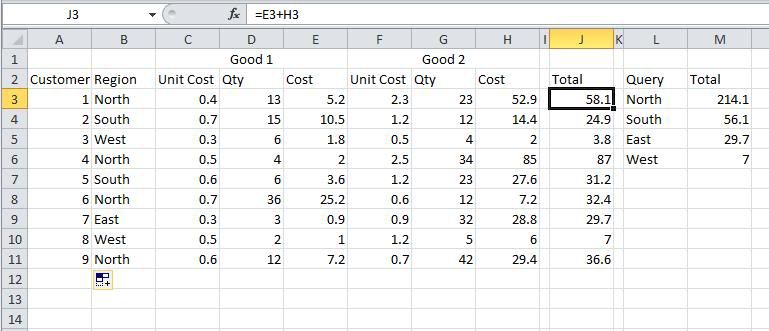
    Easiest way using '97-'03 would be to have two columns, one that sums the data you need for each row (it doesn't need to be part of the dataset) and then another that is the sumif.

  4. #4
    I have no idea. I have computer science graduates do this lowly stuff for me.
    Quote Originally Posted by Steely Glint View Post
    It's actually the original French billion, which is bi-million, which is a million to the power of 2. We adopted the word, and then they changed it, presumably as revenge for Crecy and Agincourt, and then the treasonous Americans adopted the new French usage and spread it all over the world. And now we have to use it.

    And that's Why I'm Voting Leave.

  5. #5
    Quote Originally Posted by RandBlade View Post
    Excel '07 onwards can do this incredibly easily. Excel '97-'03 couldn't easily, you'd have to do it in a more ugly manner.

    Easiest way using '97-'03 would be to have two columns, one that sums the data you need for each row (it doesn't need to be part of the dataset) and then another that is the sumif.
    Using the latest version, it's not easy according to me and two people who know a lot more about Excel than I do.

    You can certainly apply a sumif to a range of columns, but the range has to be a contiguous set of columns. These columns aren't next to each other and for stupid reasons can't be next to each other.

  6. #6
    I was thinking of the new Sumifs formula that allows multiple conditions, which wasn't allowed under Sumif.

    Why not just have another column that applies to the other columns before you sum it? Do I understand it right? You want to get the sumif totals of columns like in my quickly made up example Column E and Column H?


  7. #7
    Yes, I think we're on the same page. Somehow no one I've spoken to has heard of Sumifs...though I have a feeling that formula may not work in Google Docs

Posting Permissions

  • You may not post new threads
  • You may not post replies
  • You may not post attachments
  • You may not edit your posts
  •