Page 1 of 2 12 LastLast
Results 1 to 30 of 44

Thread: Windows 8 Consumer Preview

  1. #1
    Let sleeping tigers lie Khendraja'aro's Avatar
    Join Date
    Jan 2010
    Location
    In the forests of the night
    Posts
    6,239

    Default Windows 8 Consumer Preview

    Thought I'd share my experience since no one else expressed anything towards having tried it out.

    I have been a Windows Slate user for quite some time now - though my old Fujitsu Stylistic tablet has aged a bit. Thus I thought that the advent of Windows 8 warranted a closer look at the current offerings to gain an inkling of what summer/autumn of this year might bring.

    Now, what you may or may not know, every purchase over the Internet in a German e-shop has to have a 14-day no-questions-asked return policy. This law was created to compensate the fact that, unlike in a brick and mortar shop, you're unable to touch and try out the product. If you return the product it has to be in a perfect state, of course.

    So I ordered an Asus eee Slate through Amazon. First impression of the device itself - quite positive. Gorilla glass, leather cover, bluetooth keyboard, a charger with an USB plug (so you can charge your Smartphone at the same time), even a LCD cleaning cloth.
    Powered it up - well, it's Windows 7, what do you expect? Still, the casing has a rest for the stylus and the screen is very good at detecting your palm - which means that if you use the stylus, you won't draw all over the place accidentally with your palm. It's also Wacom-licensed which means that it's pressure sensitive.

    The USB ports are something else, though. I mean, it's nice that they're covered so well, but if you try to open them for the first time you might consider using a knife or something. You're likely to chip a nail. After you've opened them once, the whole process becomes easier, though.

    And - only a mere 2 to 3 hours of battery life. Well, in light of the i5 they included, something had to give I guess.

    Next step: Creating a rescue USB stick - they included two recovery DVDs which means that you either connect an external USB DVD drive, or you use the included tool to create a USB recovery stick. That is, if the tool actually recognizes your USB stick. Had to try three different PCs before it finally gave in.

    Off we go to the actual Windows 8 installation. Downloaded the tool, let it do a complete wipe - and immediate success.

    During my first tries, I discovered that you need to have a screen at least 1366 pixels wide to get the split screen feature. The Asus slate only has 1280. Bummer.

    Next disappointment: The device buttons do not work anymore.

    Biggest gripe, though: Random freezes - which make the whole thing unresponsive. However, it remembers your last two actions after it freezes, which means that as soon as it unfreezes, you'll probably have some random action going on.

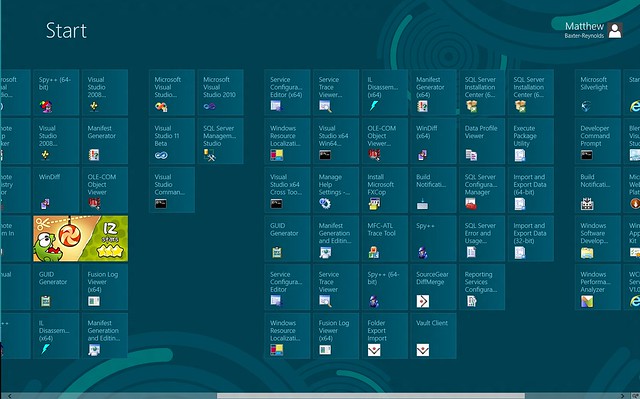
    If you press down to the Desktop, almost everything works as usual. There's the new file transfer dialog, the new taskmanager and the new "Start Menu", which I frankly find much better than the old start menu - only because companies like EA insist on putting new games under "Electronic Arts", "EA", "EA Games" and so on. None of that nonsense anymore.

    So, preliminary facit: I can see how it all will come together. Won't have that big of an impact on the Desktop user - save for the new "Start" menu (I am not speaking of Mosaic!), nothing has changed much. Tablet users with an x86 tablet will have the best of both worlds, though.

    Have to find out, though, if our beamers accept the video signal when it passed through a HDMI->VGA adapter - some of those are mounted on the ceiling and only their VGA input is accessible (I'm not exactly sure what they were thinking - it must not have occured to them that newer laptops don't have a VGA out anymore...)
    When the stars threw down their spears
    And watered heaven with their tears:
    Did he smile his work to see?
    Did he who made the lamb make thee?

  2. #2
    I, for one, am infuriated that Steve Ballmer is still in charge. He represents the epitome of everything that is wrong, wrong, WRONG!

    For starters, how come the new Windows centers around tablet use, when only like 1% of the market has got one? For desktop use, I have never tried an operative system that is more inefficient. I can forgive the bugs like sound not working, file transfers being slow, some HDDs not being recognized etc. But when it comes to features, I'm at absolute disbelief. The start menu seems to be the biggest sales point, and perhaps the biggest screw-up.


    Not quite something you would have imagined in 2012, eh? To me it appears to be an alternative design to Windows 98, except far less efficient. Gone is overview, gone is easy access to power-off buttons and anything that reminds you of a normal software suit. Naturally, you cannot get rid of this setup, and the easiest escape is to click "Desktop", which brings you to to the alpha version of Windows 7. By that I mean a really instable version without a proper, you guessed it, start menu button. Also, they've applied the same ribbon system as they had in Office 2007. The difference is that while they had actually enough functions in Office to make such a system come to use, they don't in Windows 8. Instead, the basic features that were usually accessible through a logic drop-down menu, is randomly scattered around in ribbons at the most non-handy places. It makes looking for regular options a living nightmare.

    In fact, for daily use, I recommend Windows XP, Vista or 7 over this. The appearance is horrid, stability is horrid, news are dreadful. It's only a developer's preview, I agree, but honestly the concept is something that should have been shot down 2 minutes after it was introduced on the conceptual draft board. Microsoft, please fire the dinosaur and half the staff that is seemingly useless, and hire me.
    Tomorrow is like an empty canvas that extends endlessly, what should I sketch on it?

  3. #3
    Quote Originally Posted by Khendraja'aro View Post
    And - only a mere 2 to 3 hours of battery life. Well, in light of the i5 they included, something had to give I guess.
    Try messing with the power settings. I draw out the power on mine for 5-6 hours with everything turned down. It is a shame that it has problems lasting on full-blast though, but it is a very powerful device for its form factor, so it's hard to complain too much.

    Been thinking about sticking the Windows 8 beta on there for a bit. Haven't quite gotten around to it. I don't like random freezes, so I may hold off now.

    If you get a mouse for your device, get the Arc Touch. It's awesome.

  4. #4
    Quote Originally Posted by Kazuha Vinland View Post
    In fact, for daily use, I recommend Windows XP, Vista or 7 over this. The appearance is horrid, stability is horrid, news are dreadful. It's only a developer's preview, I agree, but honestly the concept is something that should have been shot down 2 minutes after it was introduced on the conceptual draft board. Microsoft, please fire the dinosaur and half the staff that is seemingly useless, and hire me.
    Dinosaur? Aren't you the one demanding status quo? The interface has actually been pretty well recieved in most places. You might not like it (and I'll probably go for the traditional user experience on my desktop too), but you can't please everyone.

    Khen: Does the start menu still have the type-things-to-make-them run feature? I don't think I've been past the first menu in my start button in years, and I'd hate to have to start looking at icons or worse, reading things to get the programs I want. Probably only matters on the desktop, for tablet I like Metro.

  5. #5
    No, not at all. I want Windows to jump forwards, not backwards or sideways. Being young and creative, I love to think up concepts and ideas for everything - Windows not being an exception. Yet truthfully there are times when I (arrogantly?) think they could fire the entire concept department and replace them with one smart guy, and things would have been so much better.

    I honestly cannot see how this interface favoring tablet users warrants that action. It's a niche market still, and to be honest, they haven't even been very successful with it. Apple, with OSX Lion, implemented suptle changes to make the OS appear more like its mobile brother, but they were in no way as obnoxious as this one - and that despite the iPad actually being a huge success (and imo the only worthwhile tablet).
    Tomorrow is like an empty canvas that extends endlessly, what should I sketch on it?

  6. #6
    Let sleeping tigers lie Khendraja'aro's Avatar
    Join Date
    Jan 2010
    Location
    In the forests of the night
    Posts
    6,239
    Quote Originally Posted by Wraith View Post
    Try messing with the power settings. I draw out the power on mine for 5-6 hours with everything turned down. It is a shame that it has problems lasting on full-blast though, but it is a very powerful device for its form factor, so it's hard to complain too much.

    Been thinking about sticking the Windows 8 beta on there for a bit. Haven't quite gotten around to it. I don't like random freezes, so I may hold off now.

    If you get a mouse for your device, get the Arc Touch. It's awesome.
    Regarding the power settings - the low life is something not only I have noticed. And, yes, I know that it's too powerful for the formfactor to have a longer battery life. Hmmh. After I've sent this one back, I may take a look at the Samsung version. It's a bit more expensive - but it's the slate the developer preview originally ran on in the presentations.

    Well, the Arc Touch is nice. Means an occupied slot, though. Might go with a Bluetooth Mouse. Will revisit that, however, when Windows 8 has actually been finalized and proper Windows 8 tablets can be found and don't have to be retrofitted.

    Quote Originally Posted by Wraith View Post
    Khen: Does the start menu still have the type-things-to-make-them run feature? I don't think I've been past the first menu in my start button in years, and I'd hate to have to start looking at icons or worse, reading things to get the programs I want. Probably only matters on the desktop, for tablet I like Metro.
    Yes, it still has that feature. And, looking at the screenshot from Kazuha, seems as if someone did not grasp the difference between Mosaic and the Start/Search menu. You're not supposed to put everything and the kitchen sink in it and then complain that it's too much...

    Quote Originally Posted by Kazuha Vinland View Post
    (and imo the only worthwhile tablet).
    Right. The iPad is too limited for my taste. Too limited in what it can run, too limited in output options, too expensive in regards to additional hardware and next-to-no data interchange options between programs. Not to mention iTunes which has to be one of the worst software experiences on this planet: "Hey, you want to play some music on your iPad? Naw, you dummy, you can't simply drop it via mass storage! That would be too easy!"

    Have you ever used OneNote on a Windows tablet? That application alone is worth it.
    Last edited by Khendraja'aro; 03-06-2012 at 09:58 PM.
    When the stars threw down their spears
    And watered heaven with their tears:
    Did he smile his work to see?
    Did he who made the lamb make thee?

  7. #7
    Yeah, that's kind of the opposite of me. I value the iPad because of the software, not the hardware. It won't make the cut if you use it for business, I agree. Albeit in that regard I find a laptop to be way more rewarding with a physical keyboard. I think the majority of tablet users actually value the consumer part of a tablet more. So if it's the minority of the already minor market share that Windows 8 gives its focus to, then it's a miss.
    Tomorrow is like an empty canvas that extends endlessly, what should I sketch on it?

  8. #8
    Senior Member
    Join Date
    Jan 2010
    Location
    Amsterdam/Istanbul
    Posts
    12,462
    Quote Originally Posted by Kazuha Vinland View Post
    Yeah, that's kind of the opposite of me. I value the iPad because of the software, not the hardware. It won't make the cut if you use it for business, I agree. Albeit in that regard I find a laptop to be way more rewarding with a physical keyboard. I think the majority of tablet users actually value the consumer part of a tablet more. So if it's the minority of the already minor market share that Windows 8 gives its focus to, then it's a miss.
    I put it on an old laptop for laughs and to my surprise everything seems to work smoother than before. It will take some time to get used to the tile thingy. Also it seems a bit confusing to me that they kept all programs in the old environment and the new 'apps' in the tile structure.

    That may cause some problems in actually finding programs you want to open.
    Congratulations America

  9. #9
    De Oppresso Liber CitizenCain's Avatar
    Join Date
    Apr 2010
    Location
    Bottom of a bottle, on top of a woman
    Posts
    3,423
    Quote Originally Posted by Khendraja'aro View Post
    Not to mention iTunes which has to be one of the worst software experiences on this planet: "Hey, you want to play some music on your iPad? Naw, you dummy, you can't simply drop it via mass storage! That would be too easy!"
    To be fair, I've met some Apple fanbois, and maybe Apple just knows their market real well. Perhaps their customers are too stupid to figure out the drag 'n' drop. Hell, a couple weeks ago, an Apple user I know forgot the password to her MacBook. So she reinstalled OSX (with the format disk option, of course) to "recover her password" (kept calling the OS reinstall disc her "password recover disk," <sigh> so that took me a few minutes to figure out <sigh>) ... and ended up calling me to ask where all her music and videos and stuff went.

    So much dumb it actually caused me physical pain.

    Quote Originally Posted by Wraith View Post
    Dinosaur? Aren't you the one demanding status quo? The interface has actually been pretty well recieved in most places. You might not like it (and I'll probably go for the traditional user experience on my desktop too), but you can't please everyone.
    Looks a lot like they're trying to chase the "computing for dummies" style of Apple products, and it's just an awful idea, especially considering the other options they have out there (like go rip off some the sleeker Linux UIs that are both sexy and functional), and the fact that they'll never catch Apple, so they're relegating themselves to second place already. Even more damning when you consider that Apple doesn't really have a good share of the computer market, and they've been trying at it longer than MS. Apple makes toys and gadgets, not computers, so following their lead for your computer UI is just dumb.

    At this rate, Windows XP still going to be the most recent Windows OS I've bought come 2015. And I was really hoping I'd like 8 better than 7... but it's not looking good.
    "I predict future happiness for Americans if they can prevent the government from wasting the labors of the people under the pretense of taking care of them."

    "The tree of liberty must be refreshed from time to time with the blood of patriots and tyrants."

    -- Thomas Jefferson: American Founding Father, clairvoyant and seditious traitor.

  10. #10
    Are you saying that an OS should strive to be pompeous rather than minimalistic? I really don't get that idea. If you bring in the fact that functionality itself is independent on it, then surely taking the minimalistic "easy to grasp" way is better. Apple are not the only ones who strive for that.

    It's like essay writing. Sometimes a short and well-written novel can be better than a long and dull one. That said, the combination of both goods is the ideal.
    Tomorrow is like an empty canvas that extends endlessly, what should I sketch on it?

  11. #11
    So...we're back to Windows 3.0 where all of the programs are launched from the desktop in a window? Except we've kept the last two decades of updated graphic design? What about us multi-tasking, multi-beefy program using, computer users? How will Windows 8 improve my ability to work with ZBrush, Autodesk Maya, Photoshop, multiple third party programs, and an Internet Browser, all open at once across multiple monitors?

    Khen, do you know if only the included Wacom stylus will work with the tablet, or can it recognize other Wacom styluses?
    . . .

  12. #12
    De Oppresso Liber CitizenCain's Avatar
    Join Date
    Apr 2010
    Location
    Bottom of a bottle, on top of a woman
    Posts
    3,423
    Quote Originally Posted by Kazuha Vinland View Post
    Are you saying that an OS should strive to be pompeous rather than minimalistic?
    No, I'm saying it should strive to be functional. Like Illusions says...

    So...we're back to Windows 3.0 where all of the programs are launched from the desktop in a window? Except we've kept the last two decades of updated graphic design? What about us multi-tasking, multi-beefy program using, computer users? How will Windows 8 improve my ability to work with ZBrush, Autodesk Maya, Photoshop, multiple third party programs, and an Internet Browser, all open at once across multiple monitors?

    Just looks and sounds like a pretty fucking awful UI for anyone who actually wants to use their computer for more than one app at a time... or even have more than a handful of apps installed at once. I'm holding out some slim hope that maybe the UI we've seen is just the mobile/gadget UI, and there's something resembling a real computer UI that we're not seeing yet, but that keeps looking less and less likely.
    "I predict future happiness for Americans if they can prevent the government from wasting the labors of the people under the pretense of taking care of them."

    "The tree of liberty must be refreshed from time to time with the blood of patriots and tyrants."

    -- Thomas Jefferson: American Founding Father, clairvoyant and seditious traitor.

  13. #13
    .. And by that measurement you agree with the positive reviews and think that Microsoft have headed down the right path with adding this kind of functionality? That there aren't other more pressing matters, or better ways to get around it?
    Tomorrow is like an empty canvas that extends endlessly, what should I sketch on it?

  14. #14
    You can have different apps on each monitor, and there's nothing to stop programs like eg. Photoshop from retaining their traditional UI so you can still use them in the Windows7-like environment.

    I think Windows8 will really challenge Android on tablets and tablet/dock solutions (like the Transformer Prime), if they can keep costs reasonable. At the moment the only way to get any split-screen functionality on Android is through a step-child of a ROM that includes the Cornerstone addon.
    "One day, we shall die. All the other days, we shall live."

  15. #15
    The only use I can see for tablets are trains and other public means of transport where opening up a laptop might be too space consuming or awkward. Still, these aren't exactly settings I'd link with getting work done through OneNote etc. I really have a hard time seeing why people buy any tablets besides the hybrids and the iPad.
    Tomorrow is like an empty canvas that extends endlessly, what should I sketch on it?

  16. #16
    I do almost all my reading on my tablet these days and I do much of my note-taking on it too, esp. now that I've got Cornerstone. With better split-screening I'd be all over a tablet/dock combo. Great for reading, great for basic tasks like writing and surfing, and if I feel limited by the OS I'm sure there'll be some way to run Ubuntu or Arch on it.
    "One day, we shall die. All the other days, we shall live."

  17. #17
    Let sleeping tigers lie Khendraja'aro's Avatar
    Join Date
    Jan 2010
    Location
    In the forests of the night
    Posts
    6,239
    Quote Originally Posted by Illusions View Post
    So...we're back to Windows 3.0 where all of the programs are launched from the desktop in a window? Except we've kept the last two decades of updated graphic design? What about us multi-tasking, multi-beefy program using, computer users? How will Windows 8 improve my ability to work with ZBrush, Autodesk Maya, Photoshop, multiple third party programs, and an Internet Browser, all open at once across multiple monitors?

    Khen, do you know if only the included Wacom stylus will work with the tablet, or can it recognize other Wacom styluses?
    From what I've heard, they've tried to improve multi-monitor setups - for instance, the taskbar can now be stretched across more than one monitor and even have only have the programs inside one particular screen residing only in that task bar for that particular screen (I hope you understand what I meant by that). And desktop mode remains largely unchanged otherwise apart from the start menu (which is now residing under "search").

    I also just tried to use the Wacom stylus from my old tablet (which has three "buttons" - the tip, the eraser and a third one at the middle, doubling as the right mouse button) with the new tablet (which only has two buttons - tip and eraser), and it worked flawlessly.
    Thus it stands to reason that other Wacom Styluses should also work. Why license the Wacom technology otherwise?

    Quote Originally Posted by Hazir View Post
    I put it on an old laptop for laughs and to my surprise everything seems to work smoother than before. It will take some time to get used to the tile thingy. Also it seems a bit confusing to me that they kept all programs in the old environment and the new 'apps' in the tile structure.

    That may cause some problems in actually finding programs you want to open.
    Shouldn't be such a surprise since they tried to reduce resource consumption. And if you want to find a particular program - that's what the "search" is for.
    When the stars threw down their spears
    And watered heaven with their tears:
    Did he smile his work to see?
    Did he who made the lamb make thee?

  18. #18
    De Oppresso Liber CitizenCain's Avatar
    Join Date
    Apr 2010
    Location
    Bottom of a bottle, on top of a woman
    Posts
    3,423
    Quote Originally Posted by Kazuha Vinland View Post
    .. And by that measurement you agree with the positive reviews and think that Microsoft have headed down the right path with adding this kind of functionality? That there aren't other more pressing matters, or better ways to get around it?
    Dude, what the hell are you... reading?

    "Just looks and sounds like a pretty fucking awful UI" is pretty much the opposite of positive or "headed down the right path."

    And I don't know how to make my position on [what we've seen of] Windows 8's UI more clear than by calling it "pretty fucking awful."
    "I predict future happiness for Americans if they can prevent the government from wasting the labors of the people under the pretense of taking care of them."

    "The tree of liberty must be refreshed from time to time with the blood of patriots and tyrants."

    -- Thomas Jefferson: American Founding Father, clairvoyant and seditious traitor.

  19. #19
    Senior Member
    Join Date
    Jan 2010
    Location
    Amsterdam/Istanbul
    Posts
    12,462
    Eh, a lot of bitching about the UI for the apps. But I'm surprised nobody comments on how windows 8 seems to be more efficient using the hardware. I installed it on a notebook with a 1.73Ghz Intel Celeron CPU with a whopping 2GB RAM and the damn thing works faster than it ever has before.
    Congratulations America

  20. #20
    Quote Originally Posted by Khendraja'aro View Post
    From what I've heard, they've tried to improve multi-monitor setups - for instance, the taskbar can now be stretched across more than one monitor and even have only have the programs inside one particular screen residing only in that task bar for that particular screen (I hope you understand what I meant by that). And desktop mode remains largely unchanged otherwise apart from the start menu (which is now residing under "search").
    Well thats great. I've already bought a lifetime personal license for Display Fusion, at least 3 - 4 years ago, so I've been doing exactly that for that long, and with the license can do that until they stop developing Display Fusion. Before that I used Ultramon. I guess congrats to Microsoft finally getting multimonitor support down. Edit: I'm wondering if Microsoft has included as much multimonitor functionality as Display Fusion and Ultramon come with.

    I also just tried to use the Wacom stylus from my old tablet (which has three "buttons" - the tip, the eraser and a third one at the middle, doubling as the right mouse button) with the new tablet (which only has two buttons - tip and eraser), and it worked flawlessly.
    Thus it stands to reason that other Wacom Styluses should also work. Why license the Wacom technology otherwise?
    What I'm really wondering though is not whether it works with another PC tablet's Wacom stylus, but whether I'll be able to use, and gain the benefits of, my Wacom Intuos 4 tablet's stylus if I were to use it with the tablet (2048 levels of pressure sensitivity, more buttons, tilt sensitivity, and more nibs).
    . . .

  21. #21
    De Oppresso Liber CitizenCain's Avatar
    Join Date
    Apr 2010
    Location
    Bottom of a bottle, on top of a woman
    Posts
    3,423
    Quote Originally Posted by Hazir View Post
    Eh, a lot of bitching about the UI for the apps. But I'm surprised nobody comments on how windows 8 seems to be more efficient using the hardware. I installed it on a notebook with a 1.73Ghz Intel Celeron CPU with a whopping 2GB RAM and the damn thing works faster than it ever has before.
    If that's still the case once they've finished bloating up the code with their remaining features and UI fuck ups, it might be worth noting, but it's not uncommon for an alpha or beta OS to be faster than it's full fledged predecessor, if for no other reason than the alpha/beta doesn't have the full feature set to crunch through the same amount of system resources.

    Also, that system you mention has less horsepower than my smartphone, so... well, I'm just not sure how useful a slightly faster, obsolete paperweight is.
    "I predict future happiness for Americans if they can prevent the government from wasting the labors of the people under the pretense of taking care of them."

    "The tree of liberty must be refreshed from time to time with the blood of patriots and tyrants."

    -- Thomas Jefferson: American Founding Father, clairvoyant and seditious traitor.

  22. #22
    Senior Member
    Join Date
    Jan 2010
    Location
    Amsterdam/Istanbul
    Posts
    12,462
    I am fully aware of how obsolete that laptop is, that is why I was so surprised. The way it works now it may actually have gone back one step from being a paperweight to functional internet access point for the kitchen.
    Congratulations America

  23. #23
    Quote Originally Posted by Hazir View Post
    Eh, a lot of bitching about the UI for the apps. But I'm surprised nobody comments on how windows 8 seems to be more efficient using the hardware. I installed it on a notebook with a 1.73Ghz Intel Celeron CPU with a whopping 2GB RAM and the damn thing works faster than it ever has before.
    This was the first thing I noticed about the developer preview, and I was very happy to essentially get Windows7 free and running well on my old junky computers
    "One day, we shall die. All the other days, we shall live."

  24. #24
    De Oppresso Liber CitizenCain's Avatar
    Join Date
    Apr 2010
    Location
    Bottom of a bottle, on top of a woman
    Posts
    3,423
    Quote Originally Posted by Hazir View Post
    I am fully aware of how obsolete that laptop is, that is why I was so surprised. The way it works now it may actually have gone back one step from being a paperweight to functional internet access point for the kitchen.
    Will it run a modern browser at an acceptable speed?

    My experience with gear of that vintage is that even if you get a nice, lean OS running along at a tolerable clip, as soon as you hit a modern app or browser, it's back to being a paperweight. Hence, why my old gear is just sitting in the basement gathering dust... or being techie art or whatever. (That and I guess I don't feel like paying for a couple hundred kW per day for less computing power than I get out of a single 850W/h, modern system.)
    "I predict future happiness for Americans if they can prevent the government from wasting the labors of the people under the pretense of taking care of them."

    "The tree of liberty must be refreshed from time to time with the blood of patriots and tyrants."

    -- Thomas Jefferson: American Founding Father, clairvoyant and seditious traitor.

  25. #25
    Senior Member
    Join Date
    Jan 2010
    Location
    Amsterdam/Istanbul
    Posts
    12,462
    Quote Originally Posted by CitizenCain View Post
    Will it run a modern browser at an acceptable speed?

    My experience with gear of that vintage is that even if you get a nice, lean OS running along at a tolerable clip, as soon as you hit a modern app or browser, it's back to being a paperweight. Hence, why my old gear is just sitting in the basement gathering dust... or being techie art or whatever. (That and I guess I don't feel like paying for a couple hundred kW per day for less computing power than I get out of a single 850W/h, modern system.)
    I have no complaints in that department. Works just fine with Opera, Firefox and MSIE in their latest incarnations. Here in Istanbul this is really a good way to keep guests away from my own toys without them whining about everything being soooo slow.
    Congratulations America

  26. #26
    Let sleeping tigers lie Khendraja'aro's Avatar
    Join Date
    Jan 2010
    Location
    In the forests of the night
    Posts
    6,239
    Just sent the ASUS slate back and am now trying the Samsung Series 7. Let's see how that works out.
    When the stars threw down their spears
    And watered heaven with their tears:
    Did he smile his work to see?
    Did he who made the lamb make thee?

  27. #27
    Quote Originally Posted by Khendraja'aro View Post
    Just sent the ASUS slate back and am now trying the Samsung Series 7. Let's see how that works out.
    I've heard its better. I didn't want to say anything about it since I didn't know you could return the Asus slate, and I didn't want you to feel bad. Theres an entire thread about this on another forum I frequent (Asus/Samsung/Artist oriented slate tablets) if you'd like me to link you to it, but its mainly art related.
    . . .

  28. #28
    Let sleeping tigers lie Khendraja'aro's Avatar
    Join Date
    Jan 2010
    Location
    In the forests of the night
    Posts
    6,239
    Well, the battery life effectively doubled. Resolution is higher and the included docking station is a nice idea. Everything else works just as well, minus the random freezes.
    When the stars threw down their spears
    And watered heaven with their tears:
    Did he smile his work to see?
    Did he who made the lamb make thee?

  29. #29
    Let sleeping tigers lie Khendraja'aro's Avatar
    Join Date
    Jan 2010
    Location
    In the forests of the night
    Posts
    6,239
    Yes, the Samsung tablet is better.

    Currently trying to figure out how to get a draggable <div> going under the MetroUI. <div draggable="true"> isn't the solution, sadly enough.
    When the stars threw down their spears
    And watered heaven with their tears:
    Did he smile his work to see?
    Did he who made the lamb make thee?

  30. #30
    Quote Originally Posted by Khendraja'aro View Post
    Yes, the Samsung tablet is better.
    How are the random freezes you mentioned, and how fast is it compared to say, a similarly priced laptop (if you have one).

    Currently trying to figure out how to get a draggable <div> going under the MetroUI. <div draggable="true"> isn't the solution, sadly enough.
    At least with regular web coding, this would be something handled by javascript/jquery.
    . . .

Posting Permissions

  • You may not post new threads
  • You may not post replies
  • You may not post attachments
  • You may not edit your posts
  •