Page 1 of 2 12 LastLast
Results 1 to 30 of 31

Thread: PC (Gaming) Issues

Hybrid View

Previous Post Previous Post   Next Post Next Post
  1. #1

    Default PC (Gaming) Issues

    I mentioned this in the What Game are you Playing thread, but I felt that if I really did want responses I should make a separate thread.

    Basically, up until this week I'd never had any problems gaming on my pc. Granted, I don't play much (Portal, Civ V, and some random old games) but Portal had run beautifully and Civ V was okay on medium settings. I tried playing Portal 1 on Monday, and after about 3 minutes of gameplay the frame rate totally dropped off, from 60 to maybe 20 or less. Like I said, I've never had this issue before, but it made the game unplayable.

    The exact same thing is happening with Portal 2. I'll boot it up and for a couple minutes everything is hunkey-dorey, but then all of a sudden: big slow down. To fix it I would quit the game and reopen it about 10 minutes later (any less time and the frame rate was still bad) but eventually I stopped doing that and just worked with the slowness. It isn't always awful, but there's still no reason I can think of that I should have to deal with this.

    Some quick specs on my pc:
    -6 GB DDR2 RAM
    -Intel DC E5200 processor (2.5 GHz each)
    -GeForce 9200
    -640GB 7200rpm HD
    -1360x768 res

    This machine isn't even 2 years old, and I really don't know what to do to fix the problem...

  2. #2
    My first thought was software issues, but actually it sounds like a heat issue. Since it takes 10 minutes before the frame rate goes back to good, my guess would be that either your processor, or more likely, your video card, is turning itself down to avoid melting. See what its temperature is doing. If it is getting high during play, check all your fans and clear any dust with canned air.

    If that doesn't work. Virus scan & check your video drivers. Also check your power settings. Go through the list of applications you have running to see if any of them are stealing system resources. Heat is the most likely culprit IMO, though.

  3. #3
    Gah, you're probably right about overheating. I've Ctrl+Alt+Deleted to check my processes and it's definitely not that, also I updated my drivers a couple days ago and run daily virus scans.

    How do I check the temp of my video card? It's probably not a good thing that I almost never turn this computer off, eh? *facepalm*

  4. #4
    If it's your video card, not turning off your computer probably won't hurt it if you're on the desktop or in the explorer most of the time. Standard OS stuff doesn't really hit the video card. Leaving graphically intensive games running 24/7 would certainly not help, though.

    For the temperature, check the nVidia control panel. You should be able to access it by right-clicking your desktop, or possibly clicking an icon on the lower right of your screen. If it's not around, you might have to download and install their special control panel thingy from their website.

  5. #5
    After finding nothing in the control panel, I consulted the help screen, which told me to click on "System Topography" under Workstation in the Select a Task pane. Problem? I don't think there is a Workstation...

    Thanks for being so helpful, by the way, you're the man!

  6. #6
    I'd recommend using EVGA precision. It's a handy tool for controlling and monitoring your GPU fan speed, temperature, and clock speeds.

    http://www.evga.com/precision/

  7. #7
    CPUID tells me my GPU is at 168 degrees Fahrenheit (76 Celsius). So that's something.

    EDIT: at 188 while playing in good quality. 201 when it's slowed down. Probably not good...

  8. #8
    What were you doing at that temperature?

  9. #9
    Was coking about, not playing games or anything. See the edit^^

    Edit: also, CPU is at about 115 during slow play.

  10. #10
    I've suddenly realized that I have absolutely no feel for hardware tolerances in fahrenheit. I had to convert before the numbers held meaning for me.

    Yes, that's a pretty hot video card, and you're probably passing the safety threshold, prompting the slowdown. Make sure your GPU fan is running, then try cleaning out any dust with canned air while the system is off, check for any other possible airflow obstructions (in and out), then repeat the test. Hopefully you can make the problem go away with just some simple housecleaning in your case.

  11. #11
    Pretty sure the fans are running, can you confirm?

    Gotta find out if I have any canned air/non-static cloths...

  12. #12
    You shouldn't worry that much about anti-static clothes, as it's not really that big a danger unless you wear wool on a woolen floor. Anyhow, dust is most likely your issue. Just cleaning it off can make major improvements. Remember to do it in short bursts, so that the fan does not spin up prolonged causing electric current transmitted into the motherboard. Also take care of the heatsink itself, as dust often accumulates between the fins.
    Tomorrow is like an empty canvas that extends endlessly, what should I sketch on it?

  13. #13
    Quote Originally Posted by NGS View Post
    Pretty sure the fans are running, can you confirm?
    Can't. Do a visual check.
    Gotta find out if I have any canned air/non-static cloths...
    Canned air would be best, if you have it, or can get it easily. You're over 18 now, right? (I still can't believe those are carded for)

    It probably doesn't need to be said, but don't try to blow into it. And make sure it's powered down and unplugged before you spray the air. And give it a ten count before plugging back in after.

    A cloth is fine if you can't get air, but you can't find one made for the job, you want to be absolutely sure that whatever you do use won't leave any fibers behind.

  14. #14
    Quote Originally Posted by Kazuha Vinland View Post
    You shouldn't worry that much about anti-static clothes, as it's not really that big a danger unless you wear wool on a woolen floor. Anyhow, dust is most likely your issue. Just cleaning it off can make major improvements. Remember to do it in short bursts, so that the fan does not spin up prolonged causing electric current transmitted into the motherboard. Also take care of the heatsink itself, as dust often accumulates between the fins.
    Erm, not sure what the second half of that means grammaticality/technically. I'll be careful though.
    Quote Originally Posted by Wraith View Post
    Can't. Do a visual check.

    Canned air would be best, if you have it, or can get it easily. You're over 18 now, right? (I still can't believe those are carded for)
    So just take the case off while the pc is running?

    Yeah, I'm 18, didn't know they carded for that...because of the possibility of getting high off it, right?

    On a side note, it's funny how my perception of my own computer knowledge is put in perspective online. AFK I know more about all of this than any of my friends or family, and almost anyone I talk to. But I don't know the first thing about programming or any of the technical aspects of computers/the internet. So being on here is humbling, which is good.

  15. #15
    Quote Originally Posted by NGS View Post
    So just take the case off while the pc is running?
    Yep. It's safe, if you don't go poking around at the same time.

    Yeah, I'm 18, didn't know they carded for that...because of the possibility of getting high off it, right?
    That's what I'm told. I'm not sure if it's actually a law, or just a store policy that a lot of stores have, but I haven't been able to buy canned air without my ID in years.

  16. #16
    Quote Originally Posted by NGS View Post
    Erm, not sure what the second half of that means grammaticality/technically. I'll be careful though.

    A processor is usually cooled by what's called a heatsink (slob of metal) and a fan placed onto it. These vary dramatically in size and shape. The fins are basically the spaces between that metal, where there sometimes can become an awful lot of dust. That hinders heat dissipation by a lot. For graphics cards, these heatsinks are usually hidden by a cover. Then you shouldn't necessarily take the cover off, but you can always attempt to blow "into" the graphics card nonetheless.

    So just take the case off while the pc is running?
    You can look at the fan while it's on, but do not spray it before it's shut off.

    On a side note, it's funny how my perception of my own computer knowledge is put in perspective online. AFK I know more about all of this than any of my friends or family, and almost anyone I talk to. But I don't know the first thing about programming or any of the technical aspects of computers/the internet. So being on here is humbling, which is good.
    But then again there are some serious geeks on TWF. When you are able to handpick (the ideal) components off your mind for 500, 750 and 1000$ budgets and make variations based on factors such as noise isolation, gaming performance and rendering performance, then you've come a long way!

    You can always buy a new graphics card to get a lot better performance, too. Depending on your power supply, that might not be a viable option, but for 110$ you get something that renders your own card super slow.

    EVGA GeForce GTX 460

    Edit: Might as well dish in what I consider the most decent value build these days.

    Case: Antec Three Hundred
    Processor: Intel Core i5 2500K
    Graphics: PNY GeForce GTX 560 Ti
    Motherboard: MSI P55-CD53
    RAM: Patriot "Sector 5" 1600MHz 4GB
    SSD: Intel 320 40GB
    HDD: Samsung SpinPoint F3 500GB
    Burner: LG GH24NS70
    Cooler: Corsair A50
    Power Supply: OCZ ModXStream 500W

    Combo Packs: 1 | 2 | Standalone Products: 1 | 2 | 3 | 4 | 5 | 6

    Price tag: 850$ w/ free shipping

    It's surprisingly cheap to get a capable build these days.
    Last edited by Kazuha Vinland; 04-23-2011 at 01:30 PM.
    Tomorrow is like an empty canvas that extends endlessly, what should I sketch on it?

  17. #17
    Just be aware when you spray compressed air onto your hardware while the system is running, and avoid rigorously shaking the can / turning it upside down. It will spray liquid droplets that could cause a short and fry the electronics.

  18. #18
    Reaffirming what everyone has already mentioned in bits.

    Dust out your computer. Canned air, kept upright as possible, if you need to get underneath your videocard to clean out the fan, bend that straw just as much as your tipping that can. Blow out the video card fan and CPU fan.

    Leave the PC open and run a game, something like one of the FutureMark programs looped would work fine. While its running make sure the fans are blowing. If you can't tell if your video card fan is moving cause of its position (carefully) try to stick something soft tipped into it. No joke, you've got to figure out somehow.

    Your 9200 is a low end card so its likely got a very cheap heatsink and fan. You can either replace that heatsink combo with something from newegg/froogle for under $20, or cram a cheap 80-120mm fan into your case so its blowing on the card. I'm betting you can pick up one of those from a local mom and pop repair shop for super cheap. Just make sure your PSU has a spare plug (and you get a fan that matches).

    You could also get a new video card. You have a pretty good selection to pick from, even if you want to keep the budget to under $50.
    "In a field where an overlooked bug could cost millions, you want people who will speak their minds, even if they’re sometimes obnoxious about it."

  19. #19
    OG, what setup are you running currently?

    Edit: Oh, and for the record. The Geforce GTX 460 is between 17 and 20 times faster than the graphics card you have got now. If you buy the OCZ ModXStream 500W power supply with it, the charge ends up at 140$. Sure OG's alternative is cheaper, but it really wouldn't be that bad with an upgrade in your case.
    Last edited by Kazuha Vinland; 04-23-2011 at 03:01 PM.
    Tomorrow is like an empty canvas that extends endlessly, what should I sketch on it?

  20. #20
    Nothing has changed in the past year or so.

    AMD Phenom II X4 945 3ghz
    4gb DDR2
    Don't even remember the specific motherboard
    ATI/AMD 4850
    2 1tb drives in raid0

    I'm holding off till Nintendo's console announcement before I throw down more money on a new PC. The current console generation really killed the PC progress. I want to bump up the memory, but that would require moving up to DDR3, which would mean a new motherboard, and the AMD 939 design is being phased out this year, so that would be a waste there.

    Looks like I simply need to wait some more, and start saving, because when I do upgrade, its not going to be cheap
    "In a field where an overlooked bug could cost millions, you want people who will speak their minds, even if they’re sometimes obnoxious about it."

  21. #21
    Oh, I bet it will be quite a lot cheaper than what you paid back then, even when considering the aggressive pricing of AMD's HD 4xxx line-up. I'm frankly looking forward to Intel's Ivy Bridge put up against AMD's coming Bulldozer generation. The predictions so far have led in the direction that Bulldozer will be just slightly faster than Intel's current Sandy Bridge, which worries me a bit, since then Intel can really give them a solid beating with the die shrink and suddenly the market is way less competitive.

    I also slightly wonder what will happen in the storage category. OCZ Vertex 3 being based on the Sandforce controller(s) almost breaches the SATA 3 limit already. I can't see it withstanding another generation of drives. Not that I'd ever buy an OCZ labeled SSD. They use low graded USB memory and hence got a huge failure rate of 17%. You don't want that for something that stores your data. ;_;
    Tomorrow is like an empty canvas that extends endlessly, what should I sketch on it?

  22. #22
    Thanks again for the advice, guys. Although I appreciate the hardware recommendations, I'll be leaving for college in a few months, and hence won't be seeing this computer much, so I don't feel that a hardware upgrade is worth the money. (BTW along these lines, I might need some laptop buying advice in the near future. How does a Dell XPS sound for a college kid?)

    I'll get to work on cleaning and let you guys know what happens.

  23. #23
    That depends on how spread out your college is. XPS notebooks aren't made with weight or battery life being the most important concerns.
    "In a field where an overlooked bug could cost millions, you want people who will speak their minds, even if they’re sometimes obnoxious about it."

  24. #24
    NGS, feel free to leave me a note whenever you're ready to go ahead with your buy. I've been leading a stickied topic recommending computer components, monitors and laptops for two years now. Hence I practically have the entire market at my fingertips, and should be able to give super-competent advice.

    As Ominous Gamer pointed out about the Dell XPS, it is not the most mobile laptop around. What you do get however is an excellent display if you choose to spend the 150$ upgrade on the Full HD B+RGLED option (you should!). Combined with excellent speakers it is a good multimedia model. Quite ironically I wouldn't recommend the higher-end line of the series, as I prefer a dual core processor rather than a quad in a laptop. The quad after all has a 10W higher Thermal Design Power (TDP) that both drains your battery faster, heats up the machine faster and makes it noisier. The power of the ordinary i5 Sandy Bridge based processors is plenty enough.

    Yet hit me up when the time's close, as the market changes virtually every week.
    Tomorrow is like an empty canvas that extends endlessly, what should I sketch on it?

  25. #25
    I'll be sure to do so, thanks so much. Portability isn't a huge issue, as I'll probably carry it in my backpack (and a few extra pounds to lug around never hurt anyone), but battery life is the biggest sticking point with the XPS. That's for a different day though...

    Just finished cleaning, Christ Almighty was that thing dusty! No problems to speak of with the cloths or canned air. I feel like an idiot, but if there was a fan for my GPU I couldn't find it. Obviously the giant CPU one was in need of cleaning, so that got some major treatment, but, yeah, can someone please tell me where my GPU is in all of this?


    It's there in the bottom left, innit?


    Also, holy crap from what I can tell right now this has helped temps so much. GPU is at 47 (116) degrees right now, down from 76 (168) during normal use. I'll edit soon with in-game stats.

  26. #26
    Someone ate it.


    You have an integrated GPU. Its part of the motherboard. Likely under that heatsink thats covered in shadow. I bet it was overheating because the dust in the CPU heatsink was stopping the CPU fan from circulating air over it.
    If you purchase a video card, it would go in the PCIexpress slot, the one thats neon green.


    That bottom card could be anything from a modem/audio/USB (check the back of the machine and see whats plugs into it).
    "In a field where an overlooked bug could cost millions, you want people who will speak their minds, even if they’re sometimes obnoxious about it."

  27. #27
    That makes so much sense. Honestly that thing in the bottom left didn't look anything like what I know a GPU should, but it was all I could guess haha.

    After an hour of gameplay the hottest it's gotten is 57 (134) degrees with no slowdown. Thank you thank you thank you all so much.

  28. #28
    Seems like it. I had nearly forgotten that nVidia supplied integrated low-end graphics for Intel back then. Well, it's strictly speaking not that long ago, but they certainly don't anymore!

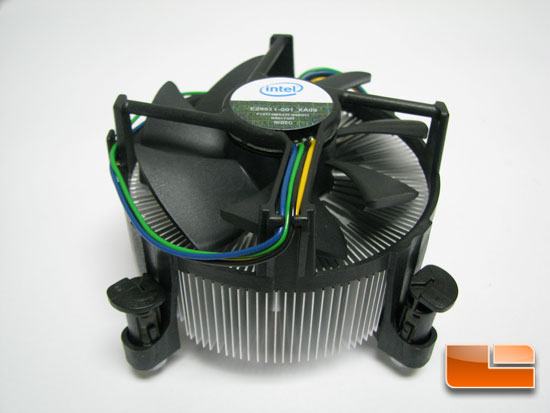
    And that is the most awkwardly shaped CPU cooler I have seen in a long while.
    Tomorrow is like an empty canvas that extends endlessly, what should I sketch on it?

  29. #29
    New (non-gaming; couldn't edit the title) problems! Yaaaayyyy!!!

    Okay, so over the past week and a half now my Vista computer has been the victim of at least a dozen freezes. Usually it's while I'm playing music or watching a video (but tbh those are routine tasks so it's not like they're the causes) and the audio skips, and keeps skipping on the same note over and over again. Sometimes now the music is skipping briefly, then resuming as normal, giving me heart attacks. The computer doesn't shut itself down--in all this time I've only ever gotten one BSOD--and sometimes it's been frozen when I sit down to use it.

    Obviously the first thing I've done is google this, and I've learned that it's either a driver problem or a hardware problem. I thought it may have been my video drivers at first, but I can't even roll those back. Also, earlier today it froze in Safe Mode, which is leading me to believe it's a hardware issue, though I'll try Safe Mode again to make sure. My core temperatures and voltages and fan speeds are all normal. The warranty has expired.

    What should I be doing?

  30. #30
    Try a different media player first. Download K-Lite Mega Codec Pack, which essentially lets you play off any video and audio file in any player (although I like the Media Player Classic bundled).
    Tomorrow is like an empty canvas that extends endlessly, what should I sketch on it?

Posting Permissions

  • You may not post new threads
  • You may not post replies
  • You may not post attachments
  • You may not edit your posts
  •