Results 1 to 11 of 11

Thread: Copy data from web form to Excel?

Hybrid View

Previous Post Previous Post   Next Post Next Post
  1. #1

    Default Copy data from web form to Excel?

    I've got a web-application which I'm trying to get data from to be able to do calculations in Excel with. Unfortunately its in the relatively early days of this apps development (for which I have no say in) and there's no export to Excel button on this page.

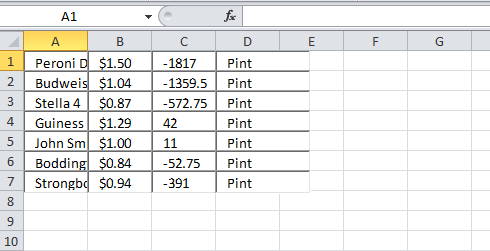
    Each table is made up of rows of form fields (which you can over-write the data with), with 4 columns for each row.

    I've tried everything I can think of and am hitting a brick wall. Excel's import from web page doesn't work as its not a table so doesn't get the data. Highlighting, copying and pasting into Excel results in form fields being copied across with the data inside ... so can't do anything in Excel as its not actually in a cell to link to. Copying text-only fails as it discards the form fields altogether so the result is blank.

    Any ideas?

    Here's some screenshots with some garbage data as an example clipped to show the table only. On the webpage:


    Copied and pasted into Excel:
    Quote Originally Posted by Ominous Gamer View Post
    ℬeing upset is understandable, but be upset at yourself for poor planning, not at the world by acting like a spoiled bitch during an interview.

  2. #2
    How you tried copying the info into a go between program? Such as wordpad? It might be able to retain enough of the formatting so excel can see the table, without copying over the table as you are doing...
    "In a field where an overlooked bug could cost millions, you want people who will speak their minds, even if they’re sometimes obnoxious about it."

  3. #3
    Quote Originally Posted by Ominous Gamer View Post
    How you tried copying the info into a go between program? Such as wordpad? It might be able to retain enough of the formatting so excel can see the table, without copying over the table as you are doing...
    Not a bad idea but unfortunately it just ignores the contents of the fields and just pastes lots of blank spaces and the letter X at the end of the line.
    Quote Originally Posted by Ominous Gamer View Post
    ℬeing upset is understandable, but be upset at yourself for poor planning, not at the world by acting like a spoiled bitch during an interview.

  4. #4
    My best bet would be something like OG's suggestion. Copy it into a .txt, then try opening the .txt in Excel. You'll get an 'import wizard' and you can have it use spaces as your delimiter between cells. It normally works pretty well for instrumentation data that isn't formatted into cells; I would imagine this is similar. If that doesn't work there are more sophisticated parsing algorithms you can use - I would normally write these in a general purpose data manipulation program like MATLAB, though.

    There might be a more sophisticated technological solution, especially if you can change the website's coding.

  5. #5
    Let sleeping tigers lie Khendraja'aro's Avatar
    Join Date
    Jan 2010
    Location
    In the forests of the night
    Posts
    6,239
    You could also try something like Greasemonkey - this way you can change the contents on the page to change it into something Excel will accept
    When the stars threw down their spears
    And watered heaven with their tears:
    Did he smile his work to see?
    Did he who made the lamb make thee?

  6. #6
    "One day, we shall die. All the other days, we shall live."

  7. #7
    Nothing to do with cutting and pasting will work because HTML form elements look like this.

    Code:
    <input type="text" value="Stella 4" />
    So there's really nothing to capture with cut and paste.

    Your only hope is to either do the macro thingie whatsit in Minx's link or get a browser with a console and do some javascript to capture the form data in a way that you can cut and paste.
    The light that once I thought compassion still casting shadows in your action
    The words you shared were cold transactions that bring me to curse what you've done
    When you're up there absorbed in greatness with such success you've grown complacent
    I hope you scorch your many faces when you fly too close to the sun

  8. #8
    Or pay a kid to do it manually
    "One day, we shall die. All the other days, we shall live."

  9. #9
    Or that.
    The light that once I thought compassion still casting shadows in your action
    The words you shared were cold transactions that bring me to curse what you've done
    When you're up there absorbed in greatness with such success you've grown complacent
    I hope you scorch your many faces when you fly too close to the sun

  10. #10
    Hmm, I never tried to copy/paste a form so I assumed the problem was in the formatting/parsing, not getting the data in the first place. There are lots of kludgy ways I can think of but nothing easy or efficient.

  11. #11
    You don't have any access to the application? If you did, it seems to me it would be easy enough to have a secondary submission button that would send you the raw data.

Posting Permissions

  • You may not post new threads
  • You may not post replies
  • You may not post attachments
  • You may not edit your posts
  •