


 Windows 8 Consumer Preview
Thought I'd share my experience since no one else expressed anything towards having tried it out.
I have been a Windows Slate user for quite some time now - though my old Fujitsu Stylistic tablet has aged a bit. Thus I thought that the advent of Windows 8 warranted a closer look at the current offerings to gain an inkling of what summer/autumn of this year might bring.
Now, what you may or may not know, every purchase over the Internet in a German e-shop has to have a 14-day no-questions-asked return policy. This law was created to compensate the fact that, unlike in a brick and mortar shop, you're unable to touch and try out the product. If you return the product it has to be in a perfect state, of course.
So I ordered an Asus eee Slate through Amazon. First impression of the device itself - quite positive. Gorilla glass, leather cover, bluetooth keyboard, a charger with an USB plug (so you can charge your Smartphone at the same time), even a LCD cleaning cloth.
Powered it up - well, it's Windows 7, what do you expect? Still, the casing has a rest for the stylus and the screen is very good at detecting your palm - which means that if you use the stylus, you won't draw all over the place accidentally with your palm. It's also Wacom-licensed which means that it's pressure sensitive.
The USB ports are something else, though. I mean, it's nice that they're covered so well, but if you try to open them for the first time you might consider using a knife or something. You're likely to chip a nail. After you've opened them once, the whole process becomes easier, though.
And - only a mere 2 to 3 hours of battery life. Well, in light of the i5 they included, something had to give I guess.
Next step: Creating a rescue USB stick - they included two recovery DVDs which means that you either connect an external USB DVD drive, or you use the included tool to create a USB recovery stick. That is, if the tool actually recognizes your USB stick. Had to try three different PCs before it finally gave in.
Off we go to the actual Windows 8 installation. Downloaded the tool, let it do a complete wipe - and immediate success.
During my first tries, I discovered that you need to have a screen at least 1366 pixels wide to get the split screen feature. The Asus slate only has 1280. Bummer.
Next disappointment: The device buttons do not work anymore.
Biggest gripe, though: Random freezes - which make the whole thing unresponsive. However, it remembers your last two actions after it freezes, which means that as soon as it unfreezes, you'll probably have some random action going on.
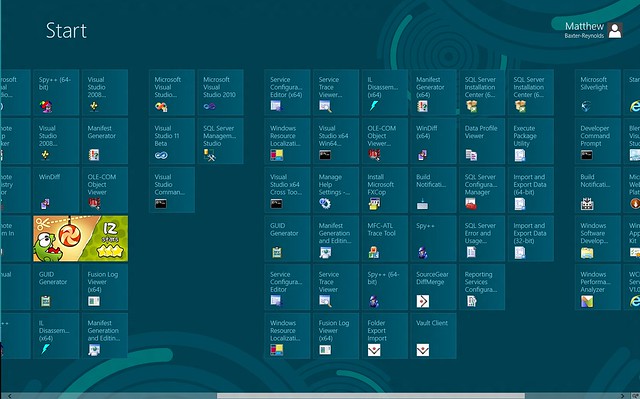
If you press down to the Desktop, almost everything works as usual. There's the new file transfer dialog, the new taskmanager and the new "Start Menu", which I frankly find much better than the old start menu - only because companies like EA insist on putting new games under "Electronic Arts", "EA", "EA Games" and so on. None of that nonsense anymore.
So, preliminary facit: I can see how it all will come together. Won't have that big of an impact on the Desktop user - save for the new "Start" menu (I am not speaking of Mosaic!), nothing has changed much. Tablet users with an x86 tablet will have the best of both worlds, though.
Have to find out, though, if our beamers accept the video signal when it passed through a HDMI->VGA adapter - some of those are mounted on the ceiling and only their VGA input is accessible (I'm not exactly sure what they were thinking - it must not have occured to them that newer laptops don't have a VGA out anymore...)

 Reply With Quote

 Originally Posted by Khendraja'aro


 And I was really hoping I'd like 8 better than 7... but it's not looking good.


